PhotoCraft: Download, GitHub, Photoshop Comparison & Alternatives
Find the official PhotoCraft download and GitHub, explore v0.8.2 news, follow a product-photo tutorial, and compare PhotoCraft vs Photoshop, GIMP, Photopea and Krita.
What is PhotoCraft?
PhotoCraft is a free, open-source desktop image editor in the ArtCraft family. Its official product page describes a Rust application for layered image editing, including masks, adjustments and editable text. Think of it as a tool for preparing a photo or composition before making a video, rather than a video-generation model.
This guide helps you find the upstream download, prepare a first product image and decide which editor fits your workflow. Our review is based on official documentation checked October 13, 2026; we have not run a hands-on benchmark or client-file migration test.
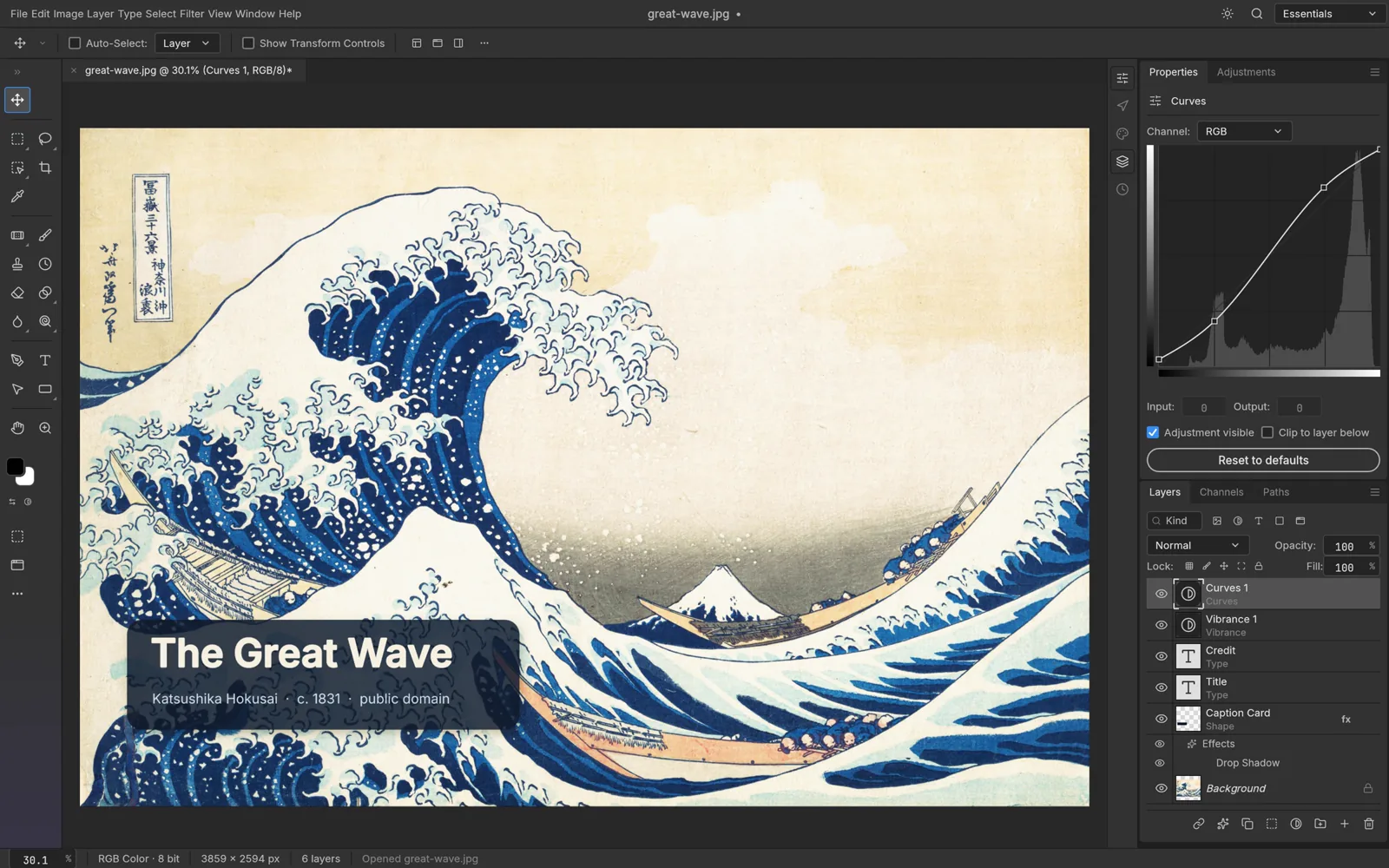
Cover: official PhotoCraft interface, showing Katsushika Hokusai's public-domain The Great Wave off Kanagawa, c. 1831. Screenshot credit: PhotoCraft contributors; see the upstream image credits.
Latest news: PhotoCraft v0.8.2 is available
The official v0.8.2 release was published October 12, 2026. Its notes include workspace docking changes, GPU compositing reuse, save-worker changes and brush or transform fixes. These are the project's release notes, not independently measured speed improvements.
At our check, the product website still linked some v0.7.0 standalone files while GitHub marked v0.8.2 as latest. If the version matters to your workflow, compare both destinations before downloading. A new version number does not remove the project's Alpha status.
PhotoCraft download: official installers and the Launcher
Start at the official PhotoCraft download page. It offers an ArtCraft Launcher for managing Crafting Apps and a standalone route for people who only want PhotoCraft. For a particular version, open GitHub Releases.
| Your computer | Standalone package to look for | What to check |
|---|---|---|
| macOS, Apple silicon or Intel | Universal DMG | App package, not the separate CLI ZIP |
| Most Windows PCs | Windows x64 MSI | Pick ARM64 only for an ARM computer |
| Linux desktop | AppImage, or the release's distribution package | Architecture and distribution compatibility |
Choose an installer from Assets. GitHub's Source code ZIP contains the project source rather than a ready-made desktop installer. The release also supplies SHA256SUMS.txt for verifying downloads. Keep the file's version and architecture with your test notes so you can reproduce a problem.
PhotoCraft GitHub: which repository is official?
The upstream repository is storytold/photocraft, linked from ArtCraft's own page. The repository provides source, issues and documentation under MIT/Apache-2.0 licensing. Other repositories with a similar name are not automatically the upstream project.
For ordinary use, choose a packaged release. For development, follow the repository's current build instructions. When reporting a bug, describe the operating system, app version, document size, steps and expected result; a small file you can legally share is more useful than an unexplained screenshot.
PhotoCraft tutorial: prepare a product photo for a short video
This is our suggested beginner workflow using the documented layer-based tools. Use a copy of your own product photo and aim for a clear reference image, not an elaborate advertisement in one canvas.
- Open a working copy. Start with a PNG or JPEG so your first exercise does not depend on a complex layered document. Keep the original untouched.
- Keep edits separate. Duplicate the image layer and name it clearly. Save a new editable document before experimenting.
- Compose one subject. Crop with the destination in mind: leave space around the product for movement and later captions. Examine the silhouette at phone size.
- Adjust gently. Use a Curves or Vibrance adjustment layer for a small tonal change. Toggle it to compare; do not invent product colors or alter label claims.
- Check a mask if you use one. Inspect fine edges at full size, then at the final viewing size. A good-looking thumbnail can hide cut-out errors.
- Save, reopen and export. Keep an editable copy, verify it reopens, then export a flat PNG or JPEG for the video reference. The format guide documents compatibility boundaries.
Menus, shortcuts and tool behavior can vary as the app evolves. The project's UI assessment is useful when a familiar Photoshop action behaves differently.
Bring the exported image into Product Ad Studio or the video creator. A first prompt to adapt: “A silver bottle rests on dark stone. The camera moves slowly sideways while a soft highlight crosses the cap. One continuous product shot.” Review the generated product geometry and text before publishing. This is an original workflow suggestion; PhotoCraft's free download does not include InstantVid's model-generation credits.
PhotoCraft vs Photoshop: documented comparison
The official parity assessment distinguishes having a menu or tool from matching its behavior. It identifies Alpha-stage gaps in professional file exchange, typography, stability and the plug-in or generative ecosystem. We would not treat a familiar toolbar as proof of production compatibility.
| Decision | PhotoCraft | Photoshop |
|---|---|---|
| Cost | Free, open source | Commercial plans; compare current regional pricing |
| Where to work | Official desktop packages; a browser build is also documented | Select a supported Adobe desktop, web or mobile workflow |
| Layered client files | Test round trips on copies | Often the required destination when a client specifies Photoshop |
| Generative image editing | Do not assume Firefly-equivalent features | Adobe documents Generative Fill |
| Plug-ins and production handoff | Validate each dependency | Keep the established workflow if a specific plug-in or deliverable requires it |
The decision is about the job: a cropped product reference has different requirements from a print-ready client PSD. Avoid comparing a free download with an undated subscription price or declaring every PSD interchangeable.
Our review: who should try it?
For learning and small personal projects: worth evaluating on copies. A useful first success is a document you can open, edit, save and reopen without changing the intended result.
For paid retouching or deadline-driven client work: run a representative file test before switching. Keep your current editor available. Our caution follows the project's own Alpha assessment, not a claim that every PhotoCraft task fails.
For AI video creators: consider it as a reference-image preparation step. Judge the exported image by clarity, truthful product appearance and usable composition, then judge video generation separately. Rust implementation alone is not a reliable speed score.
A practical review checklist you can run
Use three small test files: a plain product JPEG, a transparent PNG and a layered PSD you are allowed to edit. Record your OS, version and image dimensions.
- Can you open each file and reproduce its intended appearance?
- Can you change one layer, undo it, save and reopen successfully?
- Does the export preserve the needed dimensions, transparency and color appearance?
- If a client needs Photoshop, does the saved copy also reopen correctly there?
- Are there warnings, crashes or unexpectedly altered text and effects?
Keep an unchanged baseline beside the export. This is a proposed evaluation method, not test results or a numeric rating from InstantVid.
PhotoCraft alternative: choose by the task
| Alternative | When to consider it | Official starting point |
|---|---|---|
| Photopea | A browser editor for a quick layered-image task without a desktop installation | Photopea learning guide |
| GIMP | A free, open-source desktop image editor for photo manipulation and customization | GIMP |
| Krita | Free, open-source painting, illustration and brush-focused work | Krita |
| Photoshop | An existing Adobe workflow, required client file or documented generative features | Photoshop plans |
These choices are based on each product's documented focus. We have not ranked them with identical hardware or test files. If your actual goal is an AI product video, an image editor and a video generator serve different steps of the same workflow.
Frequently asked questions
Is PhotoCraft free?
The official product is free and open source. That does not make it an Adobe product or include Adobe subscriptions and services.
Is PhotoCraft the same as ArtCraft?
PhotoCraft is one Crafting App in the wider ArtCraft family. Our ArtCraft overview explains that distinction and the broader download options.
Can PhotoCraft replace Photoshop today?
That depends on your files and tools. The upstream project still describes Alpha-stage limitations; complete your own round-trip and workflow checks before using it for important deliveries.
Where should I check the latest version?
Use official GitHub Releases, then compare the download file with the version you intend to install. This article was checked October 13, 2026 and is not a live release monitor.
InstantVid is independent of PhotoCraft, ArtCraft and Adobe.
Sources & further reading
Sources reviewed Oct 13, 2026