Artcraft Excel Guide: GridCraft Features, Excel Comparison & Download
Meet GridCraft, the open-source ArtCraft spreadsheet. Explore its features, compare GridCraft vs Excel, find official downloads, and follow installation and beginner steps.
What is Artcraft Excel? Meet GridCraft
Checked October 14, 2026. Looking for “artcraft excel”? The application you probably mean is GridCraft, a free, open-source spreadsheet from the ArtCraft team. Written in Rust, it offers an Excel-style interface as an independent software project. It is not a Microsoft edition of Excel. Official GridCraft overview.
GridCraft, the ArtCraft AI studio and the PhotoCraft image editor are separate applications. For a video creator, a spreadsheet can organize ideas, budgets and release plans; video generation happens in a separate creative tool.
This guide reviews official documentation and release notes. We have not run a hardware benchmark or a migration test on complex customer workbooks.
Latest news: GridCraft 0.6.1 is available
At our check, the latest GitHub release was v0.6.1, published October 12, 2026. Its notes include chart interactions, legacy .xls reading, XLSX saving and preservation of VBA projects. These are developer-reported changes, not independently measured improvements. Official v0.6.1 release.
The product website's standalone section still shows 0.5.0. Check the version in GitHub's Assets before installing. The project remains Alpha: broad feature coverage does not establish complete file compatibility. Project status.
GridCraft features: spreadsheets and AI automation
The product page and repository describe:
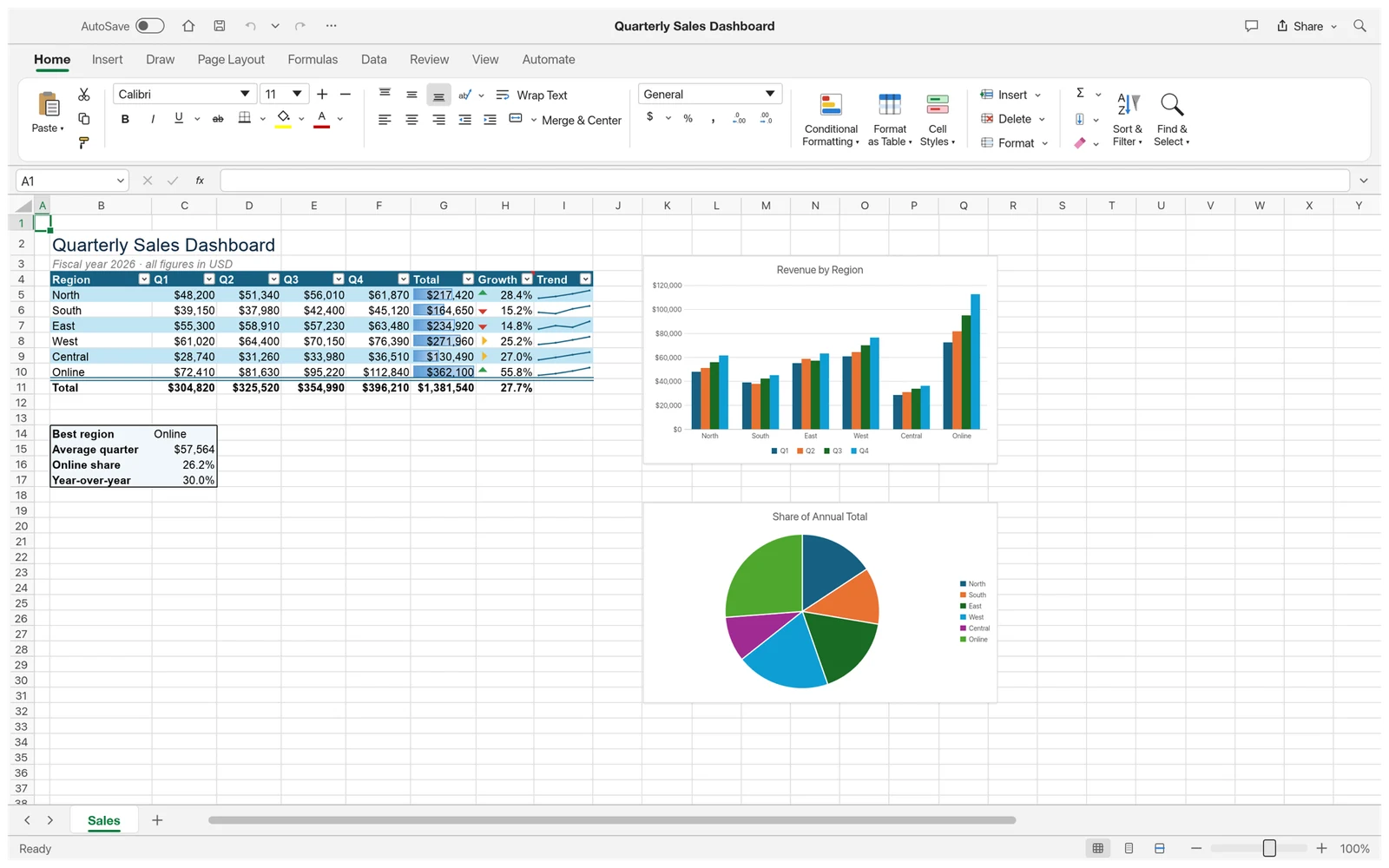
- Familiar editing: a ribbon, formula bar, sheet tabs, fill handle, cell formatting and conditional formatting.
- Calculations: over 500 functions, with dynamic arrays and functions such as LET and LAMBDA. Check the formulas your workbook actually needs.
- Data and files:
.xlsxreading and writing, sorting, filtering and validation. Opening a workbook does not prove every object will survive saving. - Charts and PivotTables: tools for visualizing and summarizing data; verify the required detail against Excel.
- Multiple platforms: macOS, Windows and Linux desktop packages, plus a WebAssembly build for self-hosting. A Web package is not automatically a hosted online service.
What makes it relevant to AI? An MCP server, CLI and control interface let an external AI client read ranges, write data, set formulas and create charts. Configure the client separately; its model service may have its own charges. Official MCP documentation.
An original task to try with a configured client: “Group this video release plan by month, count the entries per platform and create a column chart.” Check its date interpretation, ranges and saved result.
GridCraft vs Excel: a documented comparison
| Decision | GridCraft | Microsoft Excel |
|---|---|---|
| Cost and license | Free, MIT / Apache-2.0 open source | Free Web apps are available; desktop use generally needs a suitable license or subscription |
| Platforms | Native macOS, Windows and Linux; separate Web build | Windows and Mac desktop, plus Web and mobile options |
| Everyday sheets | Evaluate for a small budget, list or common formulas | Fits an established Excel-based team workflow |
.xlsx exchange |
Read/write support; test complex round trips | Direct destination when a customer specifies Excel |
| VBA | New releases preserve projects but do not execute VBA | Supported desktop editions run macros; Excel for the web cannot create, run or edit VBA |
| Power Query / data model | Gaps remain in the official assessment | Check the required feature against your edition and OS |
| Simultaneous editing | Listed as a gap in the official assessment | Supported editions can co-author through OneDrive / SharePoint Online |
| Production use | Alpha; validate using copies | Retain an established workflow when templates, macros or add-ins require it |
References: GridCraft's feature assessment, Microsoft's free Web apps and subscription comparison, Excel co-authoring, VBA limits on the Web.
A documentation discrepancy: the assessment still says VBA is discarded when opening .xlsm, but the fix merged October 11 and the 0.6.1 notes describe preserving it. Preservation is different from execution. Test macro files on copies and inspect them in the original Excel environment.
Our recommendation is task-based: try GridCraft for exploring open-source spreadsheets or personal lists. Validate macros, connections, collaboration and customer files before switching an established business workflow. This is documentation-based judgment, not a speed or reliability ranking.
GridCraft download and installation guide
Choose ArtCraft Launcher on the product page to manage Crafting Apps together, or download a standalone installer from GitHub Releases.
1. Choose your system and file
These are common files in the 0.6.1 release. GitHub's Source code ZIP is not a desktop installer; the separate CLI package is not the graphical application.
| System | Example package | Selection |
|---|---|---|
| macOS | gridcraft-0.6.1-macos-universal.dmg |
Universal for Apple silicon and Intel Macs |
| Typical Windows PC | gridcraft-0.6.1-windows-x64.msi |
Choose ARM or 32-bit files only for matching hardware; portable ZIPs also exist |
| Linux x86_64 | gridcraft-0.6.1-linux-x86_64.AppImage |
.deb, .rpm and Flatpak options are also provided |
Use aarch64 files for supported Linux ARM systems. The release supplies SHA256SUMS.txt for checking download integrity.
2. Install and launch
- macOS: open the official DMG and follow its window's instructions to install the application in Applications. If a signature or source warning appears, verify the release and consult upstream issues.
- Windows: run the MSI for your architecture and complete the installer. If using the portable ZIP, fully extract it before starting the app.
- Linux: use your distribution's package tools for the appropriate package. For AppImage, allow execution in file properties before launching.
- Check the installed version: create a blank workbook or open a sample before testing your own files on copies.
See the upstream download instructions. Return to Releases when versions change instead of relying indefinitely on these filenames.
Developers: run from GitHub source
Most users should choose an installer. To build it, first satisfy the repository's Rust and system-dependency requirements, then use its documented commands:
git clone https://github.com/storytold/gridcraft.git
cd gridcraft
cargo run --release -p gridcraft
The repository also documents Web builds. Installing a desktop app, compiling source and hosting the Web version are separate paths.
Beginner tutorial: make a video-project budget
This original exercise checks data entry, formulas and saving with invented numbers. It does not make a paid model request.
- Start a workbook. Enter Item, Quantity, Unit price and Amount in A1 through D1.
- Enter Props, 2, 15 across row 2; enter Assets, 1, 20 across row 3.
- Set D2 to
=B2*C2and D3 to=B3*C3. Expected results: 30 and 20. - Enter Total in A4 and
=SUM(D2:D3)in D4. The expected total is 50. - Format the amount column as currency. Change B2 to 3: D2 should become 45 and D4 65. Undo the change.
- Save as
video-budget.xlsx, reopen it and check values, formulas and formatting. If exchanging it with Excel, open that copy there too.
Next, add owner, deadline, reference-image and video-link columns for a project checklist. Once your assets are ready, visit the video creator. GridCraft accounts and InstantVid credits are separate.
Frequently asked questions
Is Artcraft Excel a free Microsoft Excel edition?
No. The search term usually refers to ArtCraft's independent GridCraft application. We use it to help readers find the correct project.
Can GridCraft fully replace Excel?
Do not decide from a feature list alone. Check your formulas, charts, connections, macros and file-exchange requirements, especially for complex customer files.
Do I need ArtCraft credits to download GridCraft?
Official standalone installers are free and open source. An external AI client, model service or InstantVid video generation has separate terms and costs.
Where can I find releases or report a problem?
Use GitHub Releases and Issues. Include your OS, version, reproduction steps and a small shareable file without private business data.
Related reading: ArtCraft AI overview and download guide, PhotoCraft download and Photoshop comparison.
Cover: the official GridCraft Quarterly Sales Dashboard screenshot, created by GridCraft contributors under MIT / Apache-2.0. InstantVid resized and converted it for display. See asset attribution and the MIT license. InstantVid is independent of ArtCraft, GridCraft and Microsoft.
Sources & further reading
Sources reviewed Oct 14, 2026
- GridCraft official product and download page
- GridCraft official GitHub repository
- GridCraft v0.6.1 release notesSource published
- GridCraft official feature parity assessment
- GridCraft MCP server documentation
- Microsoft free Web apps and subscription comparison
- Microsoft Excel co-authoring guide
- Microsoft Excel for the web VBA limits